Starbucks Calorie Calculator & Health Tracker (2026)
is an interactive program designed to help you monitor your Starbucks calorie intake with a database of food and drink items updated for 2026. and track your daily intake to meet your health goals. The Health Tracker is a powerful feature for monitoring your daily nutritional intake and setting personalized health goals.
How to Use the Starbucks Calorie Calculator & Health Tracker
This comprehensive guide will walk you through the full functionality of the Starbucks Calorie Counter, including its powerful Health Tracker feature. Learn how to customize your favorite Starbucks drinks, analyze their nutritional impact.
Step 1: Accessing and Expanding the Tracker
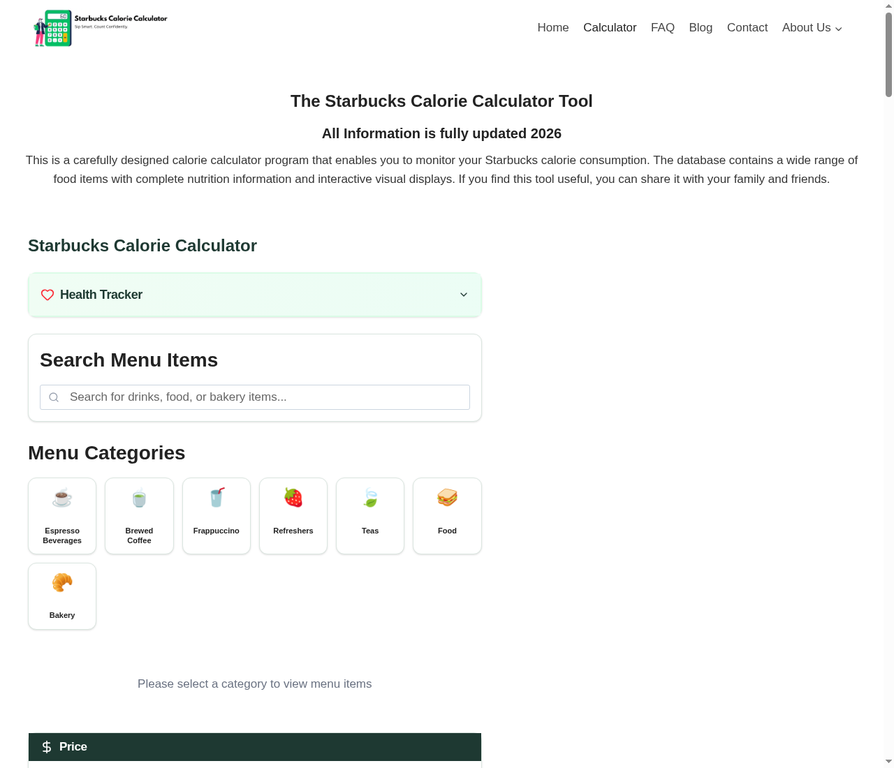
By default, the Health Tracker is located at the top of the calculator. Click on the “Health Tracker” bar to expand its advanced features.
Step 2: Setting Your Personal Goals
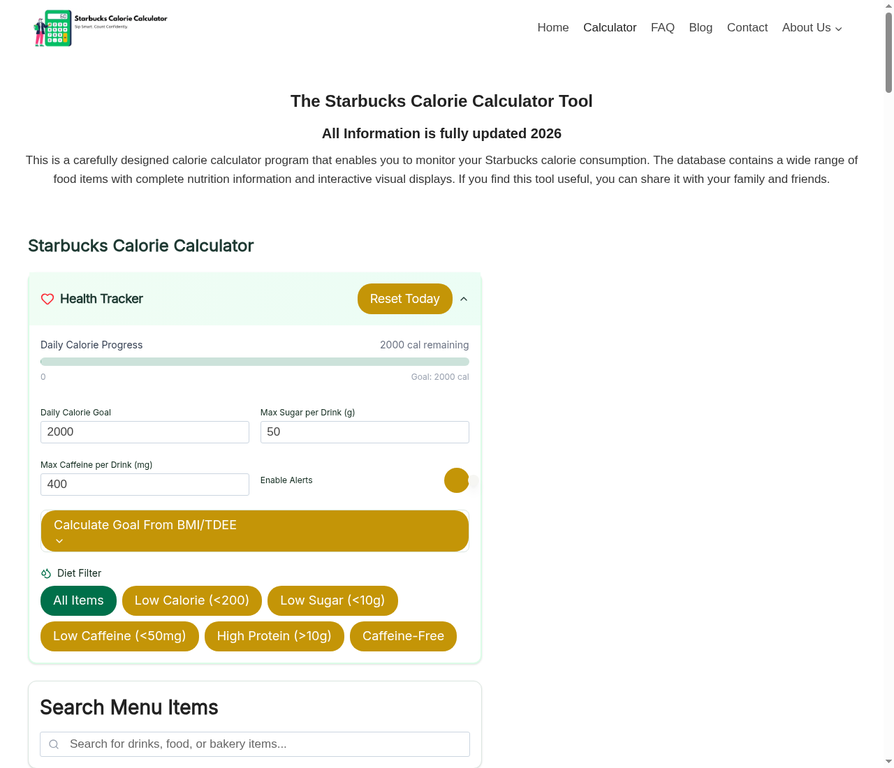
The tracker allows you to set three primary daily limits:
- Daily Calorie Goal: Set your target total calories (default is 2000).
- Max Sugar per Drink: Control your sugar intake per beverage.
- Max Caffeine per Drink: Monitor your caffeine sensitivity.
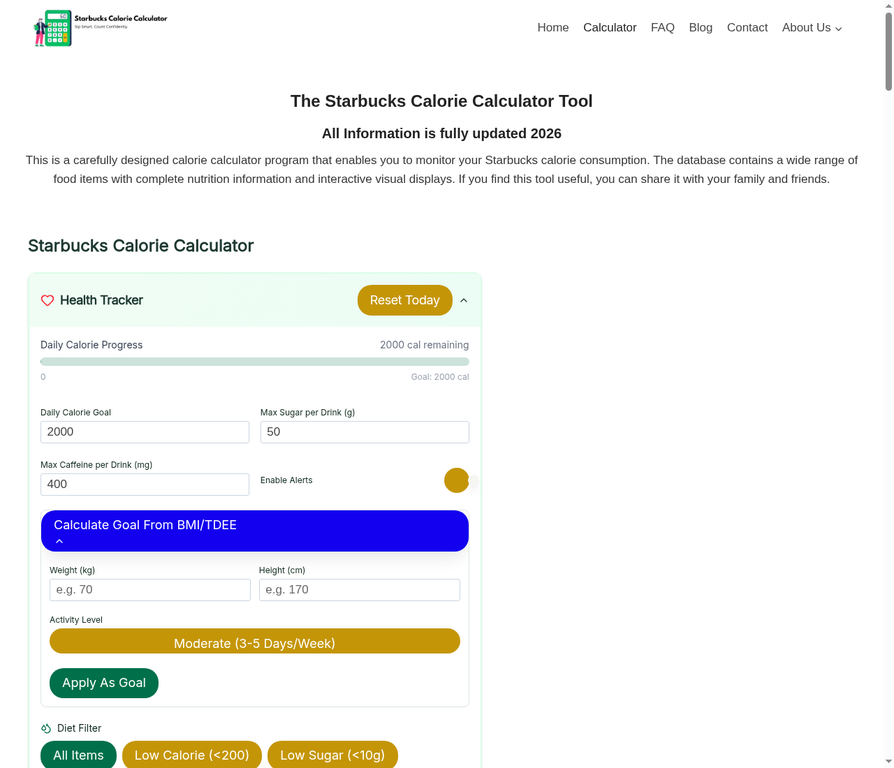
Calculate Goal From BMI/TDEE
If you’re unsure what your goals should be, use the built-in BMI/TDEE Calculator. Enter your weight, height, and activity level to receive a scientifically-backed calorie recommendation.
Step 3: Using Smart Filters
The Health Tracker provides one-click filters to instantly find items that fit your goals:
- Low Calorie (<200): Perfect for a light snack or drink.
- Low Sugar (<10g): Ideal for those monitoring blood sugar.
- High Protein (>10g): Great for post-workout options.
- Caffeine-Free: For late-night cravings.
Step 4: Logging Your Daily Intake
Once you select and customize an item, a new button appears: “+ Add Drink To Today”.
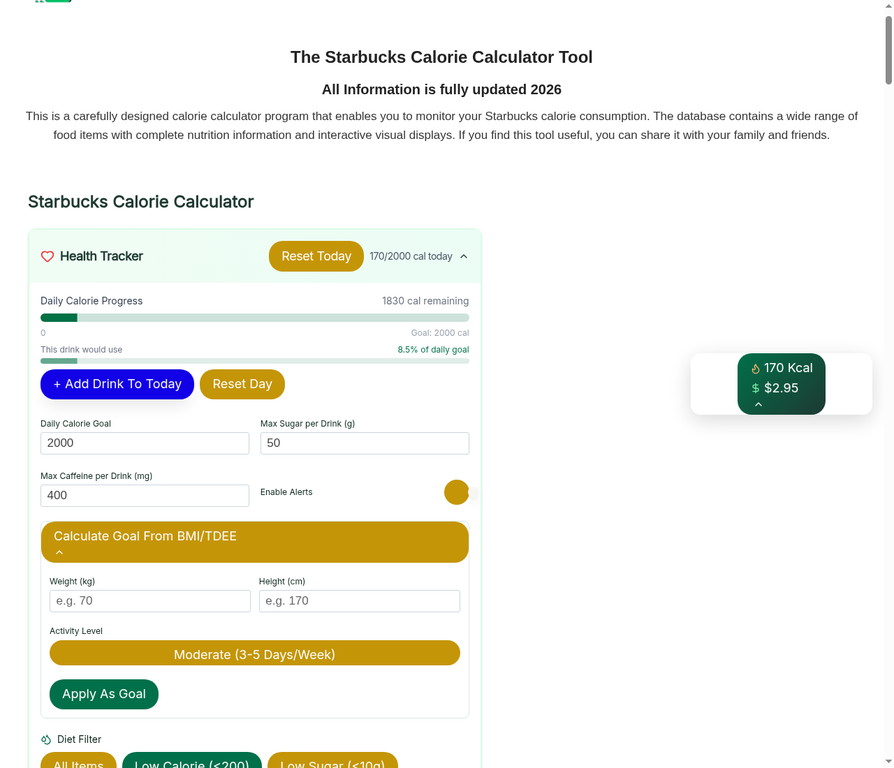
Clicking this will:
- Add the item’s calories to your Daily Calorie Progress bar.
- Show you exactly how many calories you have remaining for the day.
- Calculate what percentage of your daily goal this specific drink represents.
Step 5: Resetting Your Data
- Reset Day: Clears your current logged items but keeps your goals.
- Reset Today (Top Button): A quick way to clear all progress and start fresh for a new day.
The Starbucks Calorie Counter
Step 1: Access the Calculator
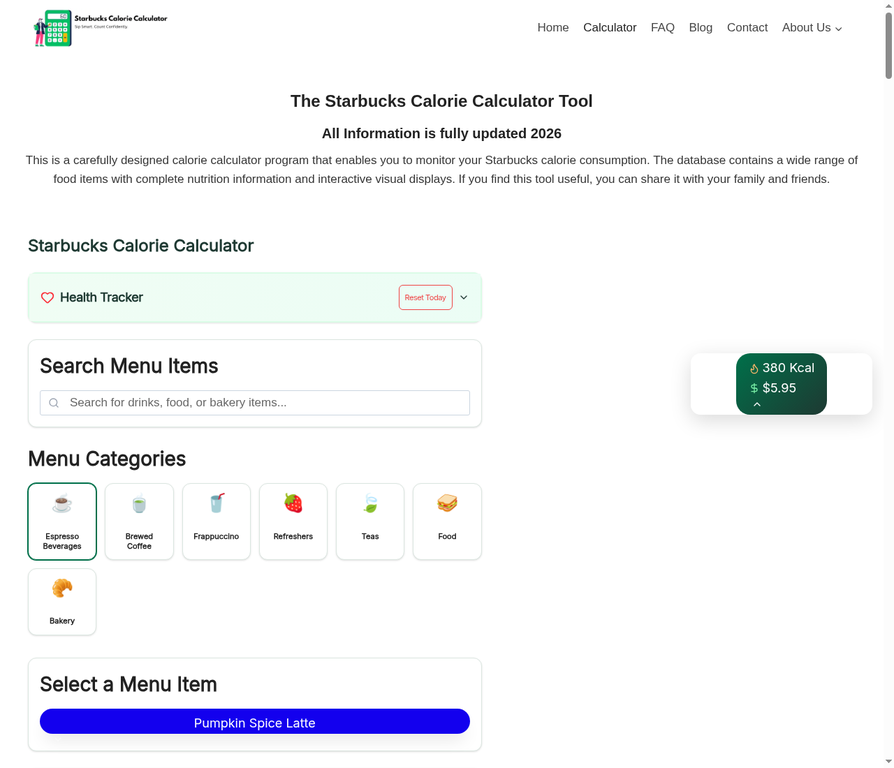
Upon visiting the website, you’ll find a clean, user-friendly interface with the main calculator prominently displayed at the top.
Step 2: Choose Your Category and Item
The calculator organizes the Starbucks menu into intuitive categories. You can either use the Search Bar to find a specific item or browse through the Menu Categories.
- Select a Category: Click on an icon like ☕️ Espresso Beverages, 🍵 Brewed Coffee, or 🥐 Bakery.
- Pick Your Item: Once a category is selected, a dropdown menu labeled “Select An Item” will appear. Click it to see the full list of available products in that category.
Step 3: Customize Your Order
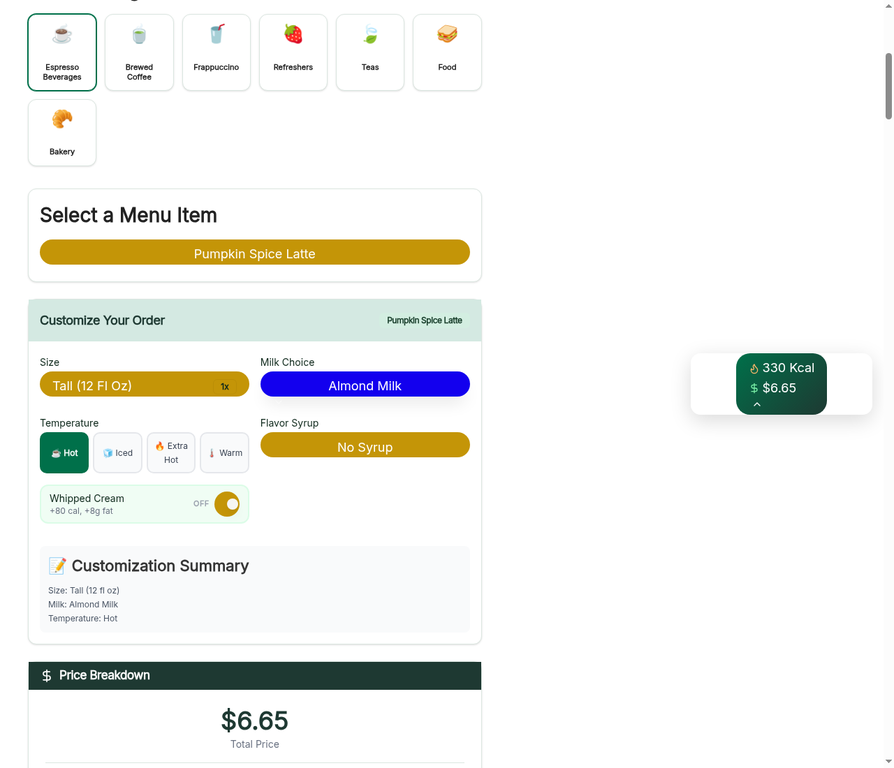
This is where you can personalize your drink. After selecting an item, such as a Pumpkin Spice Latte, you can customize various aspects:
- Size: Choose between Tall, Grande, Venti, or Trenta.
- Milk Choice: Swap the default milk for alternatives like Almond, Oat, Soy, or Nonfat milk.
- Temperature: Select Hot, Iced, Extra Hot, or Warm.
- Add-ons: Toggle options like Whipped Cream or add various Flavor Syrups.
As you make these changes, the Real-Time Nutrition Summary on the right side of the screen updates instantly, showing you the new calorie count and price.
Step 4: Analyze Detailed Nutrition & Pricing
Scroll down to see a comprehensive breakdown of your customized order:
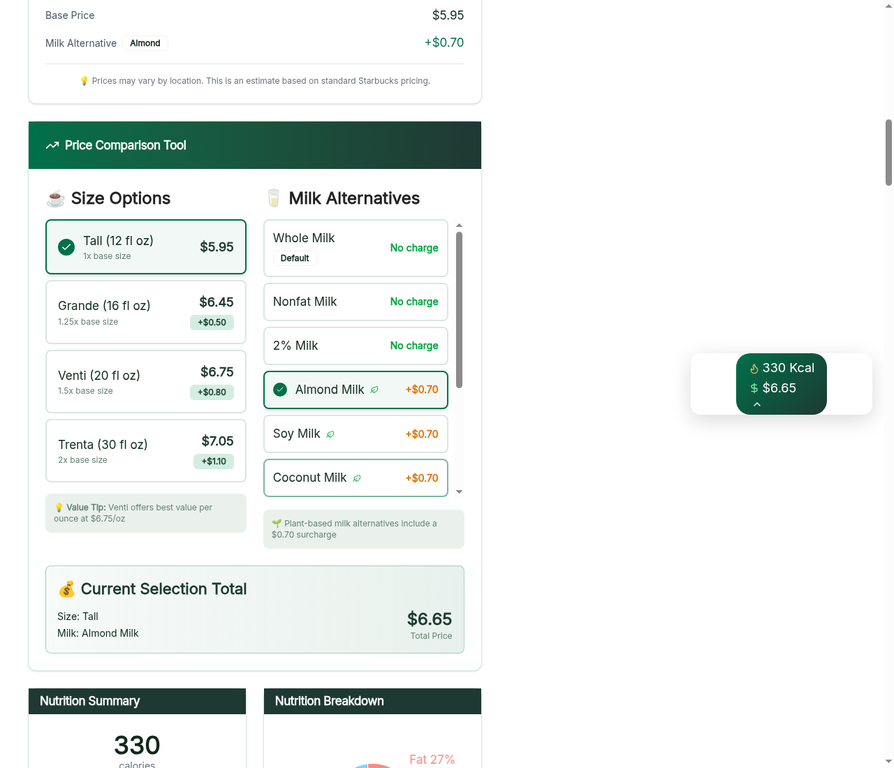
| Feature | Description |
|---|---|
| Price Breakdown | Shows the base price and any additional charges for customizations (like plant-based milk). |
| Price Comparison Tool | Compares your current selection with other sizes and milk alternatives to help you find the best value. |
| Nutrition Summary | Provides a quick glance at Calories, Fat, Cholesterol, Sodium, Carbs, Sugar, Protein, and Caffeine. |
| Detailed Breakdown | A deep dive into specific nutrients, including saturated and trans fats, fiber, and more. |
Step 5: Save, Share, or Download
Once you’ve crafted your perfect order, the tool provides several ways to keep or share your data:
- Save Order: Keep the customization for future reference.
- Download: Get a copy of your order details.
- Share: Use the “Copy” or “Share” buttons to send your customized drink stats to friends or social media.
Step 6: Visualizing Trends
Scroll down to the Trending Beverages section to see live data on what others are ordering and how those choices compare in terms of calorie density. You can toggle between Daily, Weekly, and Monthly views to see long-term trends.
Tips for a Healthier Starbucks Run
- Go Skinny: Swap whole milk for nonfat or almond milk to significantly reduce calories.
- Skip the Whip: Removing whipped cream can save you up to 80-100 calories.
- Sugar-Free Syrups: Look for sugar-free versions of your favorite flavors to cut down on sugar intake without losing the taste.
By using the Starbucks Calorie Counter and its integrated Health Tracker, you can enjoy your favorite treats while staying fully informed and in control of your health goals!
What Our Users Say
Real reviews from real Starbucks lovers
“I had no idea my daily Caramel Frappuccino had 490 calories! This calculator opened my eyes. Switched to an Iced Shaken Espresso and lost 8 pounds in a month. Absolutely love this tool!”
March 12, 2026
✔ Verified User“As a fitness trainer, I recommend this to all my clients. The real-time macro breakdown is incredibly accurate. Way better than the official Starbucks website which shows nothing useful.”
April 3, 2026
✔ Verified User“The side-by-side comparison feature is a game changer. I compared my PSL with whole milk vs oat milk and saved 180 calories just from that one swap. No other tool does this!”
February 18, 2026
✔ Verified User“I’m diabetic and need to watch my sugar carefully. The under 10g sugar filter is a lifesaver. I found 5 drinks I love and now I never have to worry when I visit Starbucks. Truly the best tool!”
May 5, 2026
✔ Verified User“Super fast, no signup, no app. I use it every single morning before my Starbucks order. The macro charts are so visual and easy to understand. Recommended it to my entire office!”
January 29, 2026
✔ Verified User“Finally a tool that covers the Canadian Starbucks menu too! The trending drinks section helped me discover low-calorie drinks I never knew existed. My go-to before every Starbucks visit.”
April 21, 2026
✔ Verified UserWhat is the Starbucks calorie calculator?
The Starbucks calorie calculator also known as the Starbucks nutrition estimator or Starbucks drink calorie checker is a free tool that lets you look up and track the calorie and macronutrient content of any Starbucks menu item. It helps you make informed choices whether you’re counting calories, following a specific diet, or just curious about your daily intake.
How accurate is the Starbucks drink calorie counter?
The Starbucks calorie counter pulls data directly from Starbucks’ official nutritional database, so values reflect the standard recipe for each drink size. Keep in mind that custom modifications extra pumps of syrup, alternative milks, or added toppings will change the final calorie count. Use the customization options in the tool to match your exact order.
Can I use this as a Starbucks macro tracker?
Yes! Beyond calories, the tool tracks fat, carbohydrates, protein, sugar, and sodium making it a full Starbucks macro tracker. You can log multiple drinks and food items per day to see your cumulative nutritional intake at a glance.
What is the Starbucks health tracker?
The Starbucks health tracker also known as the Starbucks daily wellness log or Starbucks diet planner goes beyond a single drink lookup. It lets you set a daily calorie or macro goal, log every Starbucks item you consume throughout the day, and see in real time how much of your budget remains. It turns a simple calorie lookup into a full daily health monitoring tool.
What is the difference between the calorie calculator and the health tracker?
The calorie calculator answers one question: how many calories are in this item? The Starbucks health goal tracker takes it further by letting you:
Log multiple items across an entire day
Set a personal daily calorie or macro target
Track your remaining budget in real time
Spot patterns like which drink costs you the most calories
Can the health tracker help me lose weight?
Absolutely. Used as a Starbucks calorie deficit tracker, you set your daily calorie limit and log each order as you go. The tool immediately shows whether you’re on track or over budget. This makes it easy to swap a full-sugar latte for a lighter build fewer syrup pumps, a different milk, no whipped cream without giving up your daily Starbucks habit.
Does the health tracker monitor sugar and sodium too?
Yes. As a Starbucks sugar intake tracker, the tool displays sugar, sodium, fat, and protein alongside calories. This is especially useful for people managing blood sugar, following a low-sodium diet, or tracking macros for a specific fitness goal not just counting calories.
How do I set up my daily goal in the health tracker?
Enter your daily calorie or macro target when you open the Starbucks nutrition health tracker. As you add items to your log, the tracker automatically subtracts each entry from your goal and shows a running total. You can adjust your target at any time or reset your log to start a new day.
Does the health tracker work on mobile?
Yes. The Starbucks mobile nutrition tracker is fully responsive and works on all screen sizes. Pull it up on your phone right at the counter to check nutrition before you order no app download needed, just open it in your browser.
How is this different from the official Starbucks app?
The official Starbucks app is built for ordering and collecting rewards, not for in-depth nutrition management. This Starbucks health monitoring tool is dedicated entirely to wellness comparing multiple items side by side, tracking daily totals against personal goals, and breaking down every macro. It fills the gap the official app leaves for health-conscious customers.